Play: Competitor Research Intent – Educational Intercept for ICPs
Last updated: September 15, 2026
Summary
When high-fit contacts are researching topics related to your competitors, Vector's Research Intent signal gives you an opportunity to keep your brand in the conversation.
Research Intent helps you understand when contacts are researching relevant topics across the web. For this play, you can add competitor-related topics, identify ICP contacts demonstrating that research activity, and build an audience for educational advertising.
The goal isn't to treat research activity as proof that someone is ready to buy. Instead, use it as evidence of relevant interest and an opportunity to introduce your brand while they're exploring the broader category.
Why Use This Play
Competitor research can be a useful signal that a contact is exploring a problem, category, or solution relevant to your business.
With Vector, you can combine that activity with ICP fit to:
Identify high-fit contacts researching competitor-related topics.
Build targeted audiences around that research activity.
Serve educational content that introduces your brand and point of view.
Measure subsequent campaign and website engagement.
Rather than treating competitor research as automatic buying intent, this play uses it as one piece of evidence to inform who you educate and how you engage them.
TL;DR
Start in the Signal Library, where you choose the signals you want Vector to monitor. Under Research Intent, add the competitor-related topics you care about.
Then create a Segment using Research Intent as your data source, filter by those topics, and layer in your ICP criteria. Push that audience to your preferred ad platform, serve educational content, and measure how those contacts engage.
Prerequisites
Your desired ad platform integration connected to Vector.
Defined ICP criteria, such as job title, seniority, industry, or target accounts.
Educational assets such as industry benchmarks, evaluation guides, explainer videos, or ungated content.
UTMs structured for campaign and source tracking.
Step 1: Add Competitor-Related Topics in Signal Library
Before building your Segment, you'll first tell Vector which Research Intent topics you want to monitor.
What Is Signal Library?
Signal Library is where you manage the signals you want Vector to monitor. Signals represent different types of activity or evidence that can help you understand what your buyers are doing.
For this play, we'll use the Research Intent signal.
What Is Research Intent?
Research Intent helps surface when contacts are researching topics relevant to your business across the web.
Research Intent topics are broader than individual keywords or searches. Think of each topic as an umbrella covering related research activity, rather than Vector waiting for someone to search for one exact phrase.
This is especially useful for competitor research because buyers may research a competitor, its category, related problems, or associated concepts in many different ways.
Add Your Topics
To get started:
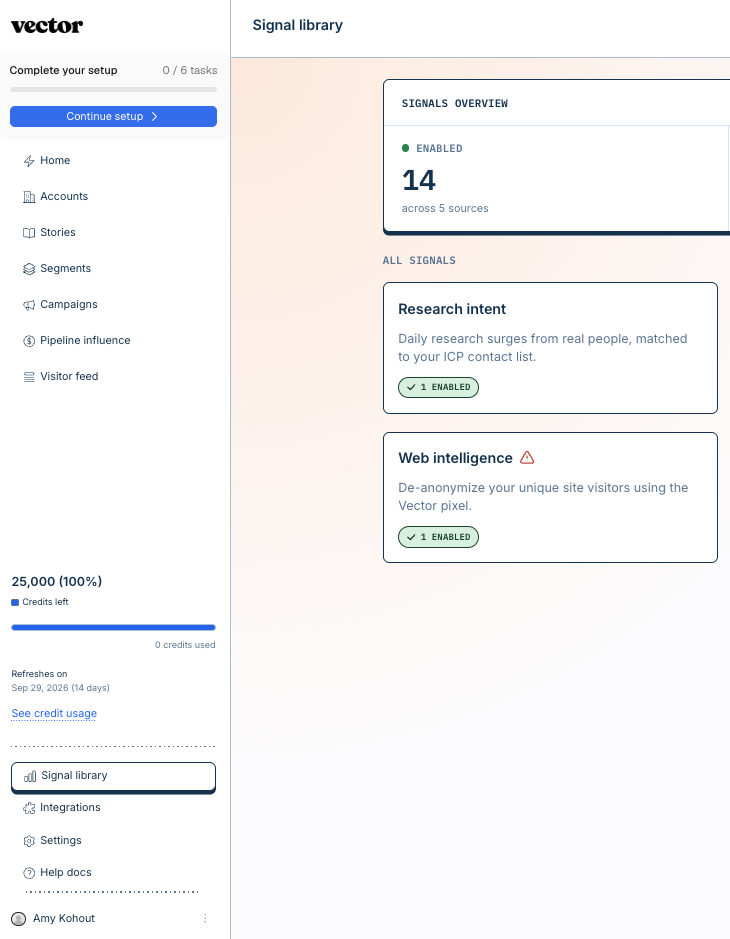
Navigate to Signal Library in the bottom-left corner of Vector.
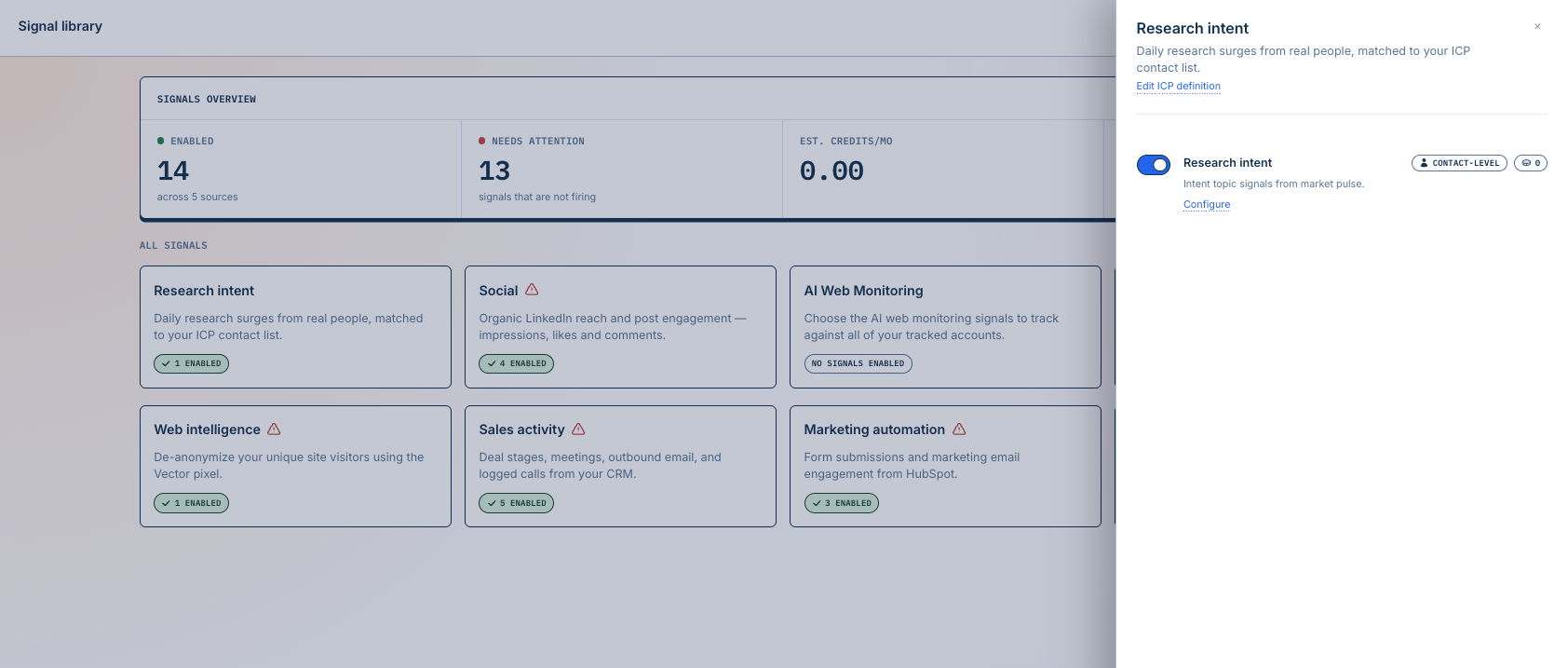
Find Research Intent.
Click Configure.
Add the competitor-related topics you want to track.
Most customers start with around 5–10 topics. A focused set gives you enough coverage while making it easier to understand the activity you're seeing before expanding further.
Don't See Any Topics Available?
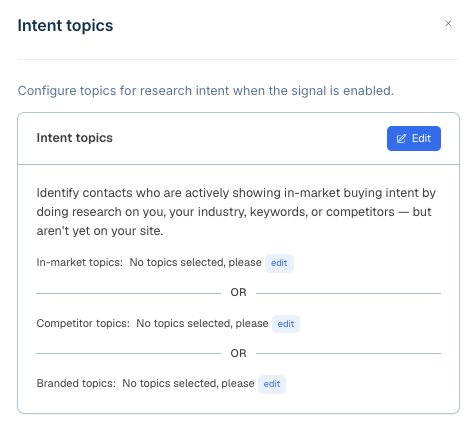
If you don't see any topics available under Signal Library → Research Intent → Configure, reach out to solutions@vector.co. Our team can help you get started.
Step 2: Turn Research Intent Into an Audience With Segments
Once you've added your competitor-related topics, you can use that activity to build an audience in Segments.
Think of the relationship this way:
Signal Library determines what you monitor → Segments determine which contacts you want to act on.
To build your audience:
Go to Segments → New Segment.
Select Research Intent as your data source.
Filter by the competitor-related topics you added.
Layer in your ICP.
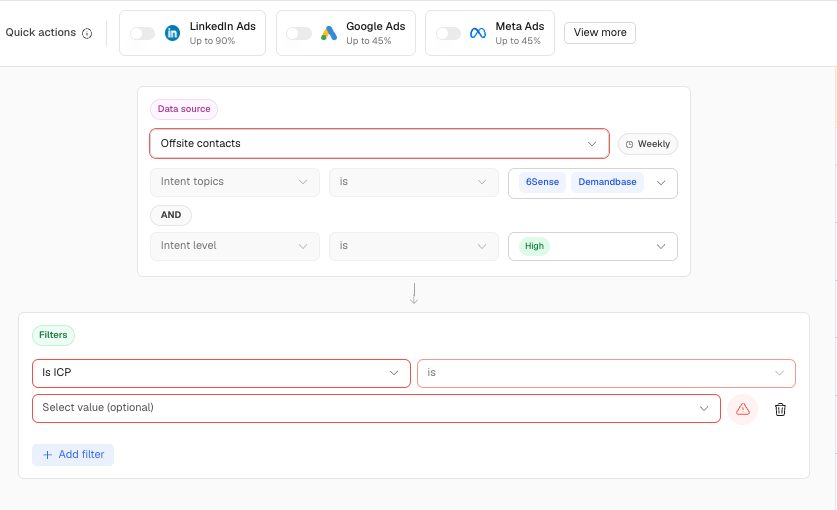
This lets you narrow the broader Research Intent activity to the high-fit contacts relevant to this campaign.
Step 3: Sync the Segment to an Ad Audience
Within your Segment, select Add Action and choose your desired ad audience destination, such as LinkedIn.
Make sure your Segment is live and the Action is enabled so eligible contacts can flow to your selected destination.
Allow time for the audience to sync and populate within the ad platform.
Step 4: Launch Your Educational Campaign
Build your campaign around early-stage education rather than direct competitor comparisons or negative messaging.
Consider content such as:
Industry trends and benchmarks
"How to evaluate" guides
Common category challenges or pitfalls
Explainer videos
Educational blog content
Buying or evaluation checklists
The goal is to provide useful information and introduce your brand's perspective while these contacts are researching the broader space.
Step 5: Measure What Happens Next
Research Intent gives you evidence of what contacts are researching. Your campaign engagement gives you another piece of the picture: how those contacts respond to your brand.
Measure how the audience engages with your ads and the content you're promoting.
You can also create a separate Segment around activity on your campaign landing pages. For example:
Website activity: Visited the page promoted in your campaign
Additional filters: ICP or account criteria as needed
Action: Send relevant activity to your CRM, Slack, webhook, or another preferred endpoint
This helps you understand whether contacts who demonstrated competitor-related Research Intent went on to engage with your own brand.
Creative and Asset Checklist
Ads: Focus on industry insights, evaluation criteria, benchmarks, or common challenges.
Assets: Use educational blog posts, guides, videos, checklists, and other value-first content.
Messaging: Educate and differentiate without attacking or directly calling out competitors.
Landing pages: Keep the experience educational and aligned with the promise of the ad.
UTMs: Use consistent campaign parameters to measure downstream engagement.
What to Measure
Consider tracking:
Audience match: How much of your Vector audience is successfully matched by your ad platform.
Campaign engagement: Clicks, CTR, and other engagement with your ads.
Website engagement: Activity on the content and landing pages you're promoting.
Pipeline progression: Whether accounts exposed to the campaign later progress through your sales process.
Research Intent is one piece of evidence. Evaluate it alongside ICP fit, campaign engagement, website activity, and your broader GTM data.
Troubleshooting
No Research Intent topics available: Reach out to solutions@vector.co and our team can help you get started.
Low Research Intent volume: Consider adding additional relevant competitor or category topics while keeping your initial topic set focused.
Not sure what your topics represent: Remember that Research Intent topics represent broader areas of research rather than individual keyword searches. [Learn more about how Research Intent works — ADD LINK].
Small ad audience: Review your ICP and Research Intent filters to determine whether you've narrowed the Segment too far.
Weak campaign engagement: Test different educational assets, messaging, or formats to understand what resonates with the audience.
Quick Setup Summary
Go to Signal Library → Research Intent → Configure.
Add around 5–10 competitor-related topics to start.
If no topics are available, reach out to solutions@vector.co.
Create a Segment using Research Intent as the data source.
Filter by your competitor-related topics and layer in ICP criteria.
Push the Segment to your preferred ad platform.
Run educational, value-first campaigns.
Measure campaign and website engagement to understand what happens next.
Need help getting started with Research Intent or setting up this play? Reach out to solutions@vector.co — we're glad to help!