Play: Event Follow-Up Advertising Campaign
Last updated: September 15, 2026
Goal
Re-engage event attendees after an in-person or virtual event to keep your brand top-of-mind and encourage the next meaningful action, whether that's engaging with additional content, booking a meeting, or exploring your product.
When to Use This Play
This play works well:
Immediately after an in-person or virtual event.
When attendees engaged with your booth, session, or content but haven't taken a next step.
When an event generated awareness but didn't lead to immediate meetings or opportunities.
When you want to continue educating attendees through paid advertising after the event.
Define Your Audience
Before building the Segment in Vector, determine which event attendees you want to include.
Consider:
Event attendance: Start with contacts who registered for or attended the event.
ICP / Persona: Narrow to the company characteristics and roles most relevant to your business.
Account or opportunity stage: Exclude contacts already in late-stage opportunities or those who have already taken your desired next step.
Event engagement: If you have the data available, consider separating highly engaged attendees—such as booth visitors or session participants—from contacts who simply attended.
These criteria can typically be established within your CRM before bringing the audience into Vector.
Step 1: Create Your Segment
Go to Segments → New Segment.
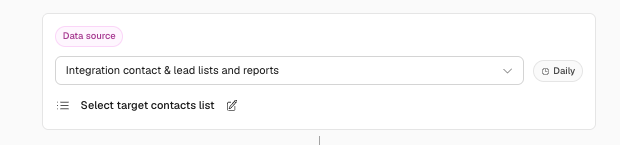
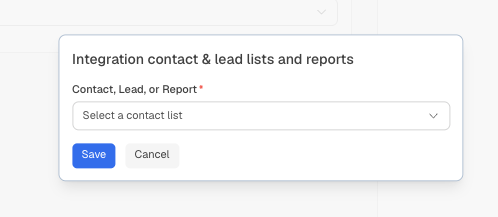
Select your CRM contact list as the data source and choose the list containing your event attendees.
If you've already defined your ICP, persona, or event-engagement criteria within your CRM, your list can arrive in Vector ready to activate.
You can also apply additional Segment filters in Vector where appropriate, such as title, seniority, industry, or other criteria that help keep the audience focused.
Step 2: Activate the Segment as an Ad Audience
Within the Segment:
Select Actions → Add Action.
Choose your preferred ad platform.
Review your estimated audience.
Enable the Segment and Action.
Allow up to 48 hours for the audience to sync and populate within your ad platform.
Once synced, confirm the audience is available within the ad channel's Audience Manager.
Step 3: Launch Your Follow-Up Ads
Within your ad channel, use the synced Vector audience for your post-event advertising campaign.
Your creative should feel like a continuation of the event rather than an unrelated ad.
Consider promoting:
Event recaps or session recordings
Content related to topics discussed at the event
Customer stories and case studies
Educational guides or resources
Product information relevant to the event theme
An opportunity to book a meeting or continue a conversation
Use consistent UTMs on your ads so you can measure subsequent campaign and website engagement.
Step 4: Measure What Attendees Do Next
Once the campaign is live, measure how your event audience engages with your ads and the content you're promoting.
You can also create an additional Segment in Vector around activity on the landing pages used in your campaign.
For example:
Website activity: Visited the page promoted in your campaign
Additional filters: Apply ICP, account, or other criteria as needed
Action: Send relevant activity to your CRM, Slack, webhook, or another preferred endpoint
This gives your team additional evidence of how event attendees are engaging with your brand after the event.
Messaging & Value Proposition
Continue the Event Conversation
Reference the themes, insights, or content attendees encountered at the event and give them a natural reason to keep engaging.
Offer a Relevant Next Step
Depending on the audience, this could include:
Event recordings
Educational content
Case studies
Product resources
Workshops
Consultations
Meetings or demos
Use Social Proof
Highlight relevant customer outcomes, quotes, or examples that reinforce the topics discussed at the event.
Keep It Timely
Make the connection to the event clear. Messaging like “Thanks for joining us” or “Continue exploring [event topic]” helps the campaign feel like a natural follow-up rather than generic retargeting.
Channels & Creative
Depending on your audience and available integrations, consider:
LinkedIn Ads: Reach the attendee audience with relevant professional content.
Display or other paid channels: Continue reaching attendees across your preferred advertising platforms.
Email + Ads: Reinforce your follow-up by coordinating CRM/email outreach with your advertising strategy.
Creative ideas might include:
“Missed this session at [Event]?” → event recording or recap
“Keep exploring [Event Topic]” → educational resource
“See how teams are approaching [Challenge]” → customer story
“Let's pick up where we left off” → meeting or consultation
Suggested Timeline
Days 0–3: Build your audience and prepare creative.
Days 3–10: Launch the first wave of follow-up advertising and other outreach.
Days 10–20: Continue nurturing contacts who engaged but haven't taken the desired next step.
Weeks 3–4: Shift toward lighter educational content for attendees who haven't yet engaged.
Adjust the timeline based on your sales cycle, event type, and audience behavior.
What to Measure
Consider tracking:
Meetings or demos booked
Ad engagement and CTR
Landing-page engagement
Content downloads or video views
Cost per desired conversion
Opportunity or pipeline progression
Performance differences between high- and low-engagement attendee cohorts
Use these metrics together to understand how your event audience continues engaging after the event rather than attributing pipeline to a single ad interaction.
Best Practices
Suppress contacts who have already converted. Avoid continuing to advertise a next step someone has already taken.
Segment based on event engagement when possible. A booth visitor may warrant different messaging from someone who simply registered.
Coordinate channels. Ads can reinforce email and Sales follow-up rather than operating as a separate motion.
Rotate creative. Keep the campaign fresh as you move further away from the event.
Stay relevant to the event. Your content and offers should connect naturally to what attendees came to learn about.
Measure subsequent engagement. Use campaign and website activity as additional evidence of how attendees are responding after the event.
Quick Setup Summary
Build or identify your event attendee contact list in your CRM.
Create a Segment in Vector using that CRM contact list.
Apply additional ICP or persona criteria as needed.
Add your preferred ad platform as a Segment Action.
Enable the Segment and allow the audience to sync.
Confirm the synced audience in the ad channel's Audience Manager.
Launch relevant post-event advertising.
Measure campaign and website engagement to understand what attendees do next.
Need help setting up your event follow-up play? Reach out to solutions@vector.co — we're glad to help!