FAQ Help Center
Last updated: June 18, 2026
Welcome to our Vector FAQ guide — here to de-spook all your questions and keep your experience running smoothly.
🛠 Product Features & Functionality
Q: I’m seeing a lot of duplicate contacts and I don’t want duplicate alerts. How can I fix that?
A: You can control this using the action frequency settings.
Q: How does it work? How does Vector know the contact information of someone visiting my site?
A: When a visitor comes to your site, Vector looks at their device fingerprint. If it matches a contact in our identity graph, Vector enriches their profile and adds them to your visitor feed.
Q: My segment isn’t pushing contact data—what gives?
A: A couple quick things to check:
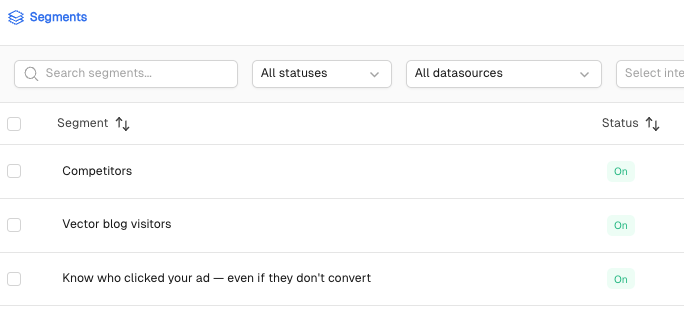
Is the segment turned on?
Head to your Segments and check the status.On = data is flowing
Off = data is off
Did you add an action to the segment?
We only push contact data after an action is selected—on purpose! This keeps things strategic and ensures you're only getting data tied to meaningful behavior.
🌐 Site De-Anonymization
Q: Where should I put the Vector pixel?
A: Install the pixel on all pages you want to track. We recommend adding it via your CMS or Google Tag Manager. Click here to add the pixel anywhere it's valuable to track.
Q: How will I see visitors that are non-U.S.-based? Which countries and regions are supported by Vector's identification service?
A: Vector is geofenced to the U.S. IP-to-company will fire only as a fallback for U.S.-based visitors.
Q: How can I change my settings to only allow users from specified domains?
A: Head to Vector Settings to manage your Allowlist and Denylist.
Q: How can I see which pages users visited?
A: Check the visitor feed in-app!
Q: I visited my own site and it showed up as someone else. Why?
A: This happens occasionally due to shared devices or login data. We’re always improving accuracy.
Q: Do you have privacy policy language for Vector?
A: Yes! Use this: By accessing our site, partners may use cookies and related tech to connect your actions to personal data they may hold (e.g., your email). We or they may send communications to those emails or profiles. To opt out, email security@vector.co.
Q: Why am I seeing anonymous visitors?
A: We prioritize accuracy over volume. You’ll see about 10% contact match rate, and ~30% with IP-to-company fallback.
Q: How accurate is Vector’s contact-level data?
A: Tests show 60–75% accuracy when compared to cookied contacts in HubSpot.
Q: How long until I start seeing visitors?
A: It depends on your traffic, but many customers see results within a few hours.
Q: How do IP-to-company fallback, domain verification, and opt-out work?
A: Use fallback IP-to-company in Pixel Settings. For domain verification, use folderit.net or *.folderit.net. For opt-out, only load Vector post-consent if using a CMP.
Q: Is Vector GDPR compliant?
A: Yes—U.S.-only geofenced.
Q: Do you service the EU?
A: We surface U.S.-based contacts only. For E.U.-based users, we may show company-level info.
Q: How can I confirm the pixel is installed correctly?
A: Open your browser console, type vector or inspect source code and search "vector".
🔍 Intent
Q: What info does Vector give for contacts showing intent?
A: Name, title, email, LinkedIn URL, and company.
Q: Is intent only based on my site traffic?
A: Nope! We monitor 36,000+ offsite topics too.
Q: Is Vector just traffic intent?
A: No—it's content intent. Our AI analyzes behavioral signals, not just page visits.
📣 Ads
Q: What is Ad Reveal?
A: It shows you contacts that clicked your ads, even if they didn’t fill out a form. To learn more, click here.
🧍♂Visitors Identified
Q: What does “Visitors Identified” mean?
A: This shows how many visitors Vector has been able to fully match to real contacts — names, titles, and companies — not just anonymous website traffic.
Think of it as the number of people Vector can actually recognize from your site.
Q: How many visitors identified can I have per month?
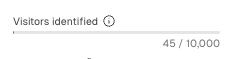
A: That depends on your plan. In the bottom left corner of your workspace, you’ll see your monthly cap on identified visitors.
For example, if your cap shows 5,000, that represents how many visitors Vector can match to contacts within your plan each month.
Once that cap is reached, new identifications pause until the next billing cycle (or until you upgrade your plan).
Q: What happens if I exceed my visitors identified for the month?
A: Once you reach your monthly limit, Vector pauses new identifications so you stay in control. We don’t automatically upgrade your plan or charge overages.
Reveal users will receive email alerts at 80% and 100% of their usage to give time to take action before identifications pause. When your new billing month starts, the pixel will automatically resume identifying new visitors.
If you’d like to increase your contact volume, you can upgrade your plan or contact support@vector.co for help.
Q: If my pixel is paused from capped visitors identified, will it backfill data from that period?
A: No. This is intentional to prevent surprise charges. When identifications pause, no new contacts are added during that time. Once your plan resets (or you upgrade), Vector resumes identifying visitors from that point forward.
Even if you hit your limit, data continues enriching behind the scenes to keep your reporting consistent.
Q: What if I want to identify more contacts?
A: You can review our pricing plans to explore options or contact support@vector.co to discuss increasing your monthly identification limit.
Target users will see an in-app message when they hit their audience limit, prompting them to reach out to our team.
📢 Ad Audiences
Q: What do “Ad Audiences” mean?
A: An audience is simply a list of contacts sent to an ad platform. Each time you connect a segment to a destination—like Google Ads, LinkedIn, or Meta—Vector creates an audience for that platform.
A single segment can have multiple audiences within it. For example, if your “High-Intent Accounts” segment is connected to both Google Ads and LinkedIn, that counts as two separate ad audiences.
The same logic applies to CSV exports—those count as audiences too.
Q: What’s the difference between segments and audiences?
A: Segments define who should be included. They’re built using conditions like triggers (for example, “visited pricing page”) and filters (for example, “ICP = true”). Audiences are where those contacts go. They’re the activated lists Vector pushes to ad platforms, formatted with the correct identifiers for each destination.
Think of it this way:
Segments = rules for inclusion.
Audiences = where those lists actually run.
Q: How can I know how many ad audiences I can build out per month?
A: You can view your current audience limit in the bottom left corner of your Vector workspace. This number represents how many total ad audiences (including CSV exports) you can create each month.
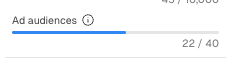
If you have questions about your limit or want to increase it, you can contact support@vector.co. Our team can also help review upgrade options if you’d like to expand your available audience count.
Q: What happens if I exceed my ad audience cap for the month?
A: Once you’ve reached your monthly ad audience limit, Vector pauses the ability to create new segments that push to ad platforms. This safeguard is in place to make sure you’re never accidentally overcharged.
You stay fully in control—you can decide whether to upgrade for more audiences or simply wait until the next month, when your limit resets automatically. All your existing audiences will keep running as usual, and your data continues enriching behind the scenes.
If you’d like to explore increasing your audience limit, reach out to support@vector.co and our team can walk you through your options.
🔗 Integrations
Q: Is Vector approved by Slack?
A: Not officially yet, but we integrate via a single-channel bot with write-only permissions.
Q: How often does Vector update Slack?
A: Slack updates trigger when a visitor is identified.
Q: How do I connect Vector with Clay or Zapier?
A: Go to Webhooks > Add Endpoint > Paste Zapier/Clay webhook > Select “contact.visited”.
Q: What if I don’t use Slack?
A: Use Zapier or Clay for other workflows. We also integrate with Salesforce, HubSpot, and Pardot.
Q: Why isn't Vector on Slack App Exchange?
A: We haven’t gone through Slack's approval process—yet! All permissions are read-only.
Q: How can I use Zapier with Webhooks?
A: Zapier’s “Hook” trigger generates a URL. Paste into Vector Webhooks. You can then send to your CRM or tool of choice.
Q: What does the fire icon in Slack mean?
A: 🔥 That contact is a repeat visitor!
Q: How often does Vector push data?
A: SiteID: every 30 mins. OffsiteID: daily.
Q: Why are website visitors not being pushed to Clay through the webhook integration?
A: Be sure to add the webhook as an action to the segment (remember the data only pushes to the action(s) you select in the segment. Additionally, make sure the segment is turned on for data to push over. Here's a great guide on how to ensure the webhook is enabled correctly.
🟠 HubSpot
Q: How do I set up HubSpot for Target Accounts?
A:
Create a Company List in HubSpot
Go to Vector → Target Accounts
Click Settings > Choose your list
Click Start Sync
Q: I made the list but don’t see it in Vector.
A: Disconnect & reconnect HubSpot. This happens if the integration is over 10 days old.
Q: How does Vector send data to HubSpot?
A: We send Site Visit Activities or Intent Activities. Segment names + IDs help populate HubSpot active lists.
🔵 Salesforce
Q: How does Vector handle people who already exist in Salesforce vs. net-new visitors?
A: This depends on your settings within Vector. In your Salesforce integration settings, you can toggle on or off options like "Create New Leads," "Create New Contacts," "Update Existing Leads," and "Update Existing Contacts" to control exactly what happens when a match is found.
Q: I want Vector to create leads only — not contacts. Is that possible?
A: Yes! Toggle on Create New Leads and toggle off Create New Contacts. This lets your internal process handle lead conversion rather than Vector deciding where contacts land.
Q: How does Vector match visitors to existing records in Salesforce?
A: Matches are based on first name, last name, and email address.
Q: I only want to send net-new people (not already in Salesforce) to my CRM. How do I set that up?
A: Toggle on Create New Leads and turn off Create New Contacts, Update Existing Contacts, and Update Existing Leads. Vector will only create new leads for people who don't already exist in Salesforce.
Q: Is there a way to filter segments to exclude accounts?
A: Yes! You can do this by adding a Synced Account List filter and setting the operation to "is not in". You can also use Account Stages and Deal Stages to filter based on things like Customers, Closed Lost, etc.
Q: How often does Vector push data to Salesforce?
A: For the All Site Visitors data source, segments send new matches in batches approximately every hour, depending on whether new visitors are identified during that window.
Q: Is the Salesforce task/activity triggered every time someone visits, or just the first time?
A: Every time a contact meets the criteria of a segment within a 24-hour period, one activity record is sent. If they visit again the following day, a second activity record is created.
Q: If I turn off "Update Existing Contacts" and turn on "Create Activity/Task" will the activity/task still be created?
A: Yes — as long as Create Activity/Task is enabled, an activity record will still be sent for existing contacts. However, no contact fields will be updated.
Q: Can I map Vector fields (like segment name, visit URL, or timestamps) to the Salesforce task object?
A: Not at this time — those fields are written to the lead or contact object only.
Q: Can I send a custom lead source field to Salesforce?
A: Yes, and we recommend it as a best practice! You can map a custom value (like "Vector") to an existing picklist field in Salesforce using the Additional Field Mappings section in your integration settings.
Q: For the deal stage filter, which opportunity does Vector reference when an account has multiple?
A: Currently it's based on the most recent close date. The Product & Engineering team is working on updating this to use the highest deal value instead.
Still got questions? Boo 👻 us at support@vector.co or check out our support docs.