Play: Website Visitors to Educational Ads for ICPs
Last updated: September 15, 2026
Summary
Most website visitors don't convert on their first visit, but their activity can still provide useful evidence of engagement.
With Vector, you can combine website activity with ICP criteria to identify high-fit contacts who have visited your site, build targeted ad audiences, and continue educating those buyers through LinkedIn or other ad platforms.
From there, measure how the audience engages with your campaigns and use that activity to inform your next steps.
Why Use This Play
Traditional retargeting often serves the same ads to broad groups of website visitors. With Vector, you can narrow your audience using both who the visitor is and what they did on your website.
This allows you to:
Focus ad spend on contacts who fit your ICP.
Use specific page activity as evidence of engagement.
Continue educating high-fit visitors after they leave your website.
Measure subsequent campaign engagement to understand which audiences and content are resonating.
TL;DR
Create a Segment that combines ICP criteria with website activity, then sync that audience to your preferred ad platform.
Serve educational, thought-leadership, or industry-focused content to keep your brand in front of high-fit visitors. Then measure campaign engagement to understand how that audience responds.
Prerequisites
Vector account with the Vector Pixel installed and tested.
CRM and desired ad platform integrations connected.
Defined ICP criteria, such as job title, seniority, industry, or account criteria.
Educational assets ready, such as blog posts, guides, explainers, videos, or industry reports.
UTM structure for measuring campaign engagement.
Step-by-Step in Vector
1. Create Your Website Activity Segment
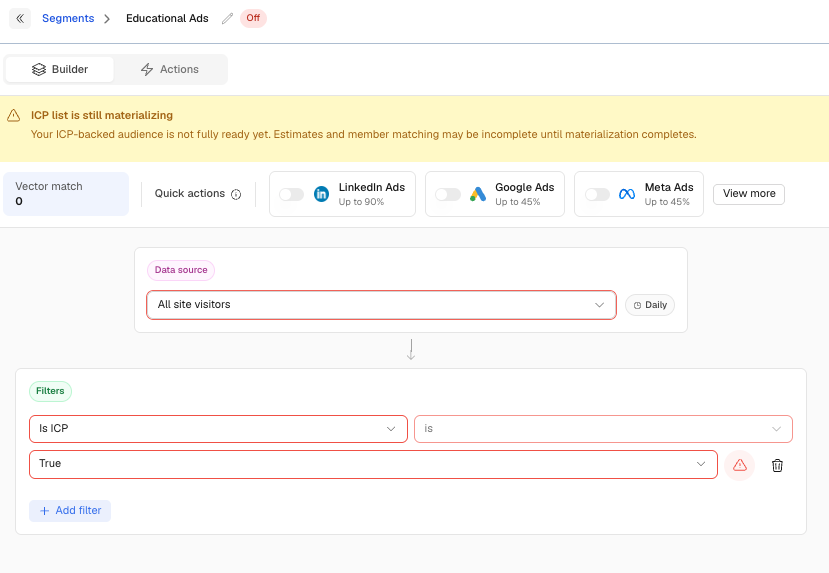
Go to Segments → New Segment.
Use your existing website activity filters to define the behavior that's relevant to this campaign. Depending on your strategy, this could include visits to specific pages or other website activity captured by Vector.
Then layer in your ICP (click here to learn more).
The goal is to create an audience of high-fit contacts with relevant website activity, rather than treating every website visitor the same.
2. Sync the Segment to Your Ad Platform
Within the Segment, select Add Action and choose your desired ad audience destination, such as LinkedIn.
Once configured, make sure your Segment is live so eligible contacts can be pushed to the selected audience.
Allow time for the audience to sync and populate within your ad platform.

3. Launch Your Educational Campaign
In your chosen ad platform, select the synced Vector audience.
Focus your creative on education and value rather than an immediate sales pitch. For example:
Industry benchmark reports
Educational guides
Thought-leadership content
Videos or explainers
Content addressing a common challenge for the role or industry
The objective is to continue the conversation with high-fit contacts who have already demonstrated relevant website activity.
4. Measure Campaign Engagement
Once your campaign is live, measure how the audience engages with your ads and the content you're promoting.
Use campaign engagement to understand which messages, assets, and audiences are resonating.
You can also create additional Segments using website activity from your campaign landing pages and route relevant engagement to your preferred endpoint, such as your CRM, Slack, or webhook.
For example:
Website activity: Visited the page promoted in your campaign
Additional filters: Apply ICP or account criteria as needed
Action: Send the activity to your preferred destination for follow-up or reporting
Creative and Asset Checklist
Ads: Clear, visual, and focused on a relevant buyer problem or insight.
Assets: Educational and value-first, such as videos, blog content, reports, or guides.
Landing pages: Make sure the page delivers on the promise of the ad and provides a clear next step.
UTMs: Use consistent campaign parameters so you can measure engagement from your ads.
What to Measure
Consider tracking:
Website identification rate: The percentage of eligible website traffic identified by Vector.
CTR: How often your audience clicks through to your content.
Campaign engagement: How the audience interacts with the content and landing pages you're promoting.
Pipeline progression: Whether accounts exposed to the campaign later progress through your sales process.
Cost per engaged account: How efficiently your campaign generates engagement from the accounts you care about.
These metrics provide evidence of how your audience is responding. They should be evaluated alongside your broader campaign and pipeline data rather than treating an individual website visit or ad interaction as proof of buying intent.
Troubleshooting
Low CTR: Test different creative, formats, or messaging based on the problems your audience cares about.
Small audience: Review whether your ICP or website activity conditions are too narrow. Expand thoughtfully rather than removing ICP criteria altogether.
High bounce rate: Make sure the landing page and content closely match the promise of the ad.
Low audience volume: Confirm your Vector Pixel is installed and tested, your Segment is live, and your ad audience Action is enabled.
Quick Setup Summary
Create a Segment using relevant website activity.
Layer in ICP criteria to identify high-fit contacts.
Sync the Segment to your preferred ad platform.
Serve educational, value-first content.
Measure campaign and website engagement.
Use that evidence to inform your next campaign or follow-up.
This approach helps you turn website activity into a more focused retargeting strategy by combining evidence of engagement with ICP fit, rather than treating every website visitor or individual activity as a signal of buying intent.
Questions on how to get started with this play? Reach out to solutions@vector.co — we're glad to help!