Building Your Ideal Customer Profile (ICP)
Last updated: September 9, 2026
Your Ideal Customer Profile (ICP) helps Vector understand what a good-fit buyer looks like for your business.
Think of ICP as your fit criteria: the job titles, seniority levels, and company characteristics that help distinguish the people and companies you care about from everyone else.
Your ICP can then be used across Vector to filter contacts and build more focused workflows.
What Does ICP Mean in Vector?
ICP answers a simple question:
Does this person or company look like someone we want to sell to?
You can define criteria around the types of buyers and companies that matter to your team, such as:
Job title
Job title exclusions
Seniority
Firmographic criteria
Once configured, Vector can use those criteria to identify and filter contacts that match your ICP.
👉 Tip: Start broader than you think you need to. You can always narrow your ICP as you learn which personas and criteria are most valuable.
Configure Your ICP
Navigate to Settings > Ideal Customer Profile to define your criteria.
For your buyer personas, you might include:
Job title contains: "VP," "Head of Marketing," or "Director"
Job title does not contain: "Intern" or "Assistant"
Seniority: C-suite, VP, Director, Manager, etc.
Add the criteria that best represent the buyers your team wants to reach.
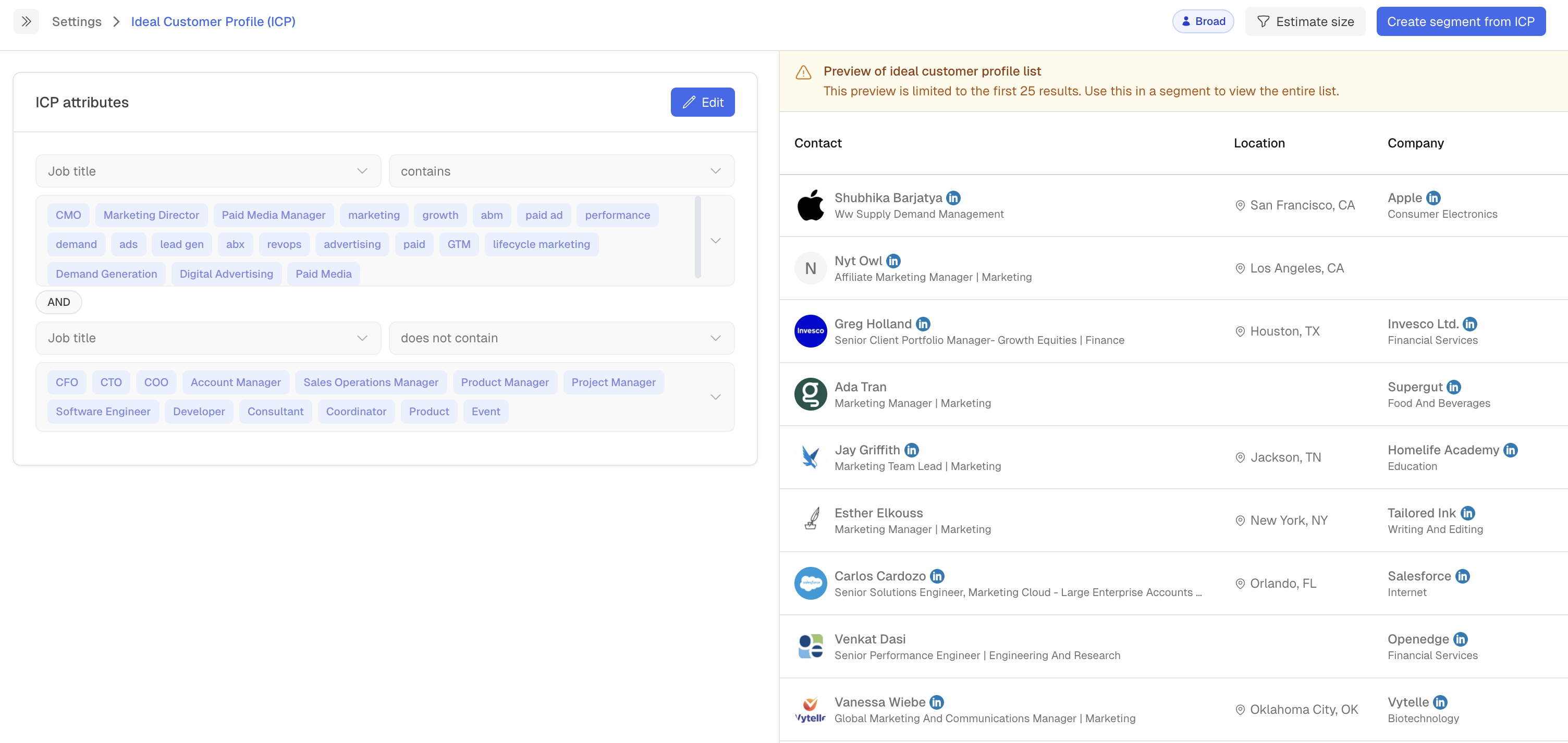
How Vector Uses Your ICP
Once you've defined your ICP, you can use it to focus workflows on the people who best match your target buyer.
For example, you can use ICP criteria when building Segments to:
Filter contacts to your best-fit personas
Focus sales workflows on relevant buyers
Build more targeted contact lists
Combine ICP with other Vector data to narrow your audience
Your ICP remains available for contact-list and Segment workflows.
ICP vs. Tracked Accounts vs. Buying Stages
These concepts work together, but they answer different questions.
ICP = Fit
Who looks like the type of buyer or company you want to reach?
Tracked Accounts = Focus
Which companies is your team actively tracking as part of your ABM strategy?
Buying Stage = Readiness
Based on the signals Vector is seeing, where does a tracked account appear to be in its buying journey?
For example, a contact might match your ICP because they're a VP of Marketing at a company that fits your criteria. Their company could also be one of your Tracked Accounts. Vector can then analyse signals from that account to determine its buying stage.
In other words, ICP tells you whether someone is a good fit. It is not the same thing as Vector's account scoring or buying stages.
Use ICP in Segments
Your existing ICP can continue to be used in Segments.
When building a Segment, use the ICP filter to narrow the contacts included in your workflow.
You can combine ICP with other filters depending on the play you're building. For example, you might want to identify:
ICP contacts visiting your website
ICP contacts engaging with a signal you're tracking
ICP contacts associated with accounts your team is tracking
This lets you add fit criteria on top of the behavioural and account-level data you're already using in Vector.
Troubleshooting
I'm not seeing the contacts I expected.
Review your ICP criteria and make sure they aren't too restrictive. Job-title filters in particular can exclude relevant contacts when they're defined too narrowly.
Does changing my ICP change an account's buying stage?
No. ICP represents fit criteria. Buying stages are determined separately based on the signals and context Vector analyses for tracked accounts.
Is an ICP account automatically a Tracked Account?
No. ICP and Tracked Accounts serve different purposes. Matching your ICP means the person or company fits the criteria you've defined. Tracked Accounts are the companies you've chosen to actively monitor as part of your ABM motion.
Can I still use ICP in Segments?
Yes. ICP remains available for contact-list and Segment workflows.