Understanding How Vector Tracks Your Ad Campaigns
Last updated: September 15, 2026
Vector can identify which advertising campaigns are driving traffic to your website in two primary ways:
UTM-based campaign detection
Native ad integrations
These methods power campaign identification and reporting inside Vector.
This article explains how campaign tracking works, what Vector looks for, and what to check if a campaign isn't appearing as expected.
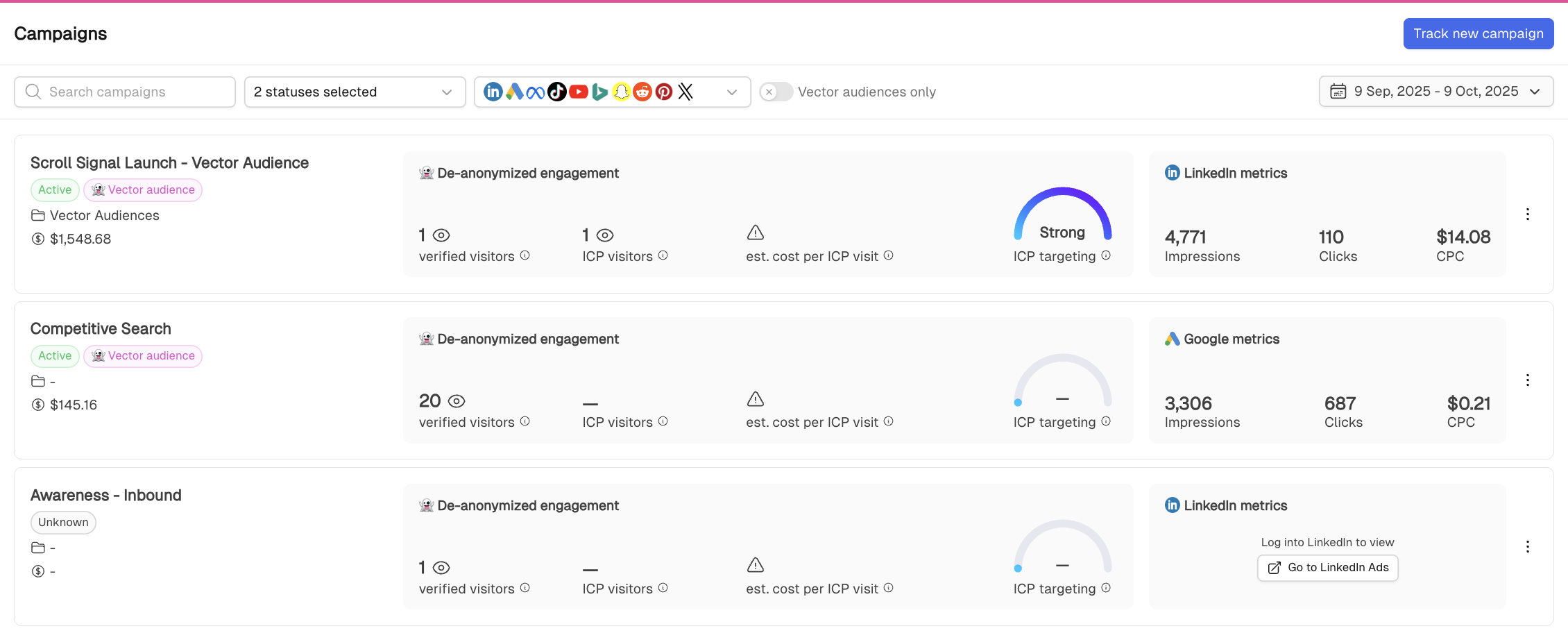
The Two Ways Vector Tracks Campaigns
Path 1: UTM-Based Detection
Vector can detect campaign traffic from your website URLs even without a native ad integration connected.
When someone clicks an ad and lands on your website, Vector looks for standard UTM parameters.
The primary parameters are:
utm_source – where the traffic came from
Examples:google,linkedin,reddit,bingutm_medium – how the traffic was delivered
Examples:paid,ppc,cpc,displayutm_campaign – the campaign identifier or name
Examples:spring_sale,brand_retargeting,finance_persona
When these parameters are present and use recognisable values, Vector can associate the visit with the appropriate campaign.
This allows campaign traffic from platforms without a native Vector integration to still appear in reporting.
Path 2: Native Ad Integrations
Vector can also pull campaign information directly from supported ad platforms.
For example, connecting Google Ads or LinkedIn Ads allows Vector to identify campaigns using data from the ad platform itself rather than relying entirely on UTM naming.
Native integrations can make campaign detection more reliable when:
Your team uses dynamic campaign naming
UTMs are generated through templates
Naming conventions vary between campaigns
You want platform-reported performance metrics inside Vector
Native integrations also allow Vector to combine website engagement with supported metrics from the ad platform.
Required UTM Parameters
For campaign detection based on website traffic, we recommend including:
utm_source
utm_medium
utm_campaign
For example:
https://example.com/demo?utm_source=linkedin&utm_medium=paid&utm_campaign=enterprise_abmIn this example:
Source: LinkedIn
Medium: Paid
Campaign: Enterprise ABM
Consistent naming makes it easier for Vector to identify and organise your campaign traffic correctly.
Why UTMs Still Matter
Even when you have a native integration connected, UTMs remain useful.
They provide the connection between:
the campaign → the ad click → the website visit
If UTMs are missing, malformed, or removed before the landing page loads, Vector may have less information available when matching an individual website visit back to its campaign.
Common issues include:
Missing
utm_campaignUnrecognised
utm_sourceUnusual
utm_mediumvaluesRedirects stripping URL parameters
Tracking templates replacing or changing UTMs
Keeping UTMs consistent helps preserve clean visit-level campaign data.
What Native Integrations Add
When supported ad platforms are connected, Vector can identify campaigns directly through the integration and retrieve additional campaign information.
For supported integrations, Vector may also apply Vector-specific tracking parameters such as:
VectorSource – identifies the ad platform
VectorCampaign – identifies the campaign
VectorID – identifies the campaign using its unique platform ID
These parameters help Vector match campaign traffic reliably even when existing UTM structures vary.
Vector adds its tracking information without replacing the tracking parameters you've already configured.
When Campaigns Appear in Vector
A campaign can appear in Vector when it is discovered through either:
Website activity containing recognised campaign parameters
A supported native ad integration
For UTM-detected campaigns, Vector needs to observe campaign traffic before it can identify the campaign automatically.
That means a newly launched campaign may not appear immediately if no one has clicked through to your website yet.
Campaigns detected through native integrations may appear independently of website traffic depending on the data available through the connected platform.
Manually Tracking a Campaign
If Vector has not automatically detected a campaign through recent UTM activity, you can manually add the campaign you want to track by clicking on "Track campaign" in the top right corner.

You may need to provide information such as:
Campaign name
Platform
Campaign UTM
Regex can be used when supported to match more complex campaign naming patterns.
Manual campaign setup is particularly helpful when your UTM naming does not follow Vector's automatic detection conventions.
Troubleshooting Missing Campaigns
If a campaign isn't appearing as expected, start with these checks.
1. Check the landing page URL
Confirm that the destination URL includes:
utm_source
utm_medium
utm_campaign
2. Review your UTM values
Make sure the values are consistent and recognisable.
For example:
utm_source=linkedin
utm_medium=paid
utm_campaign=enterprise_abm
3. Check for redirects
Some redirect tools or landing-page systems may remove tracking parameters before the visitor reaches the final page.
Test the live ad URL and confirm that the UTMs remain present after the page loads.
4. Confirm the integration
If you're using a supported native platform such as Google Ads or LinkedIn Ads, make sure the appropriate integration is connected in Integration Settings.
5. Confirm the campaign has activity
UTM-based campaign detection requires Vector to observe website traffic from that campaign.
If the campaign is brand new and hasn't generated a visit yet, it may not appear immediately.
6. Review your campaign filters
If the campaign exists but isn't visible in your current view, check your status, platform, date, and other reporting filters.
Campaign Tracking vs. Campaign Reporting
Campaign tracking is the underlying mechanism Vector uses to determine:
Which campaign did this website visit come from?
The Campaign Reporting Dashboard uses that information alongside supported ad-platform data to help answer:
How did this campaign perform?
Campaign Reporting can include metrics such as:
Impressions
Clicks
Identified visitors
ICP visitors
Cost
Cost per ICP visit
[Learn more about Campaign Reporting →]
Quick Checklist
If a campaign isn't appearing, confirm:
The landing page includes
utm_sourceThe landing page includes
utm_mediumThe landing page includes
utm_campaignYour UTM values follow consistent naming
Redirects are not stripping tracking parameters
The campaign has generated website traffic
Your supported native ad integration is connected
Your reporting filters aren't hiding the campaign
If everything looks correct but you're still having trouble, contact support@vector.co with the campaign URL and expected campaign name.
Quick Recap
Vector identifies campaigns through:
UTM-based website traffic
or
native ad integrations
UTMs connect individual website visits back to their campaign.
Native integrations improve campaign discovery and bring supported platform data into Vector.
Use Campaign Reporting to understand campaign performance.